Admin: Health Challenges
Health Challenges are real-world wellbeing activities — run a 5K, take a screen-free day, journal for a week — that members complete on their own, claim with a note or photo, and earn drops for once you approve.
You'll find them under Rewards → Health Challenges, with two views:
Approvals
Every claim a member submits lands here. Each card shows who claimed which challenge, their note, their photo if the challenge asks for one, and the drop value.
- Approve & award — credits the drops to the member's earned balance immediately. Each member can earn a given challenge once.
- Reject — asks you for a short reason, which the member sees on the challenge card next to Try again. A rejected member can fix their evidence and resubmit.
Challenges
The catalog your members see on Wellspring, filterable by category (Movement, Mindfulness, Screen Time, Sleep, Nutrition, Connection, Outdoors).
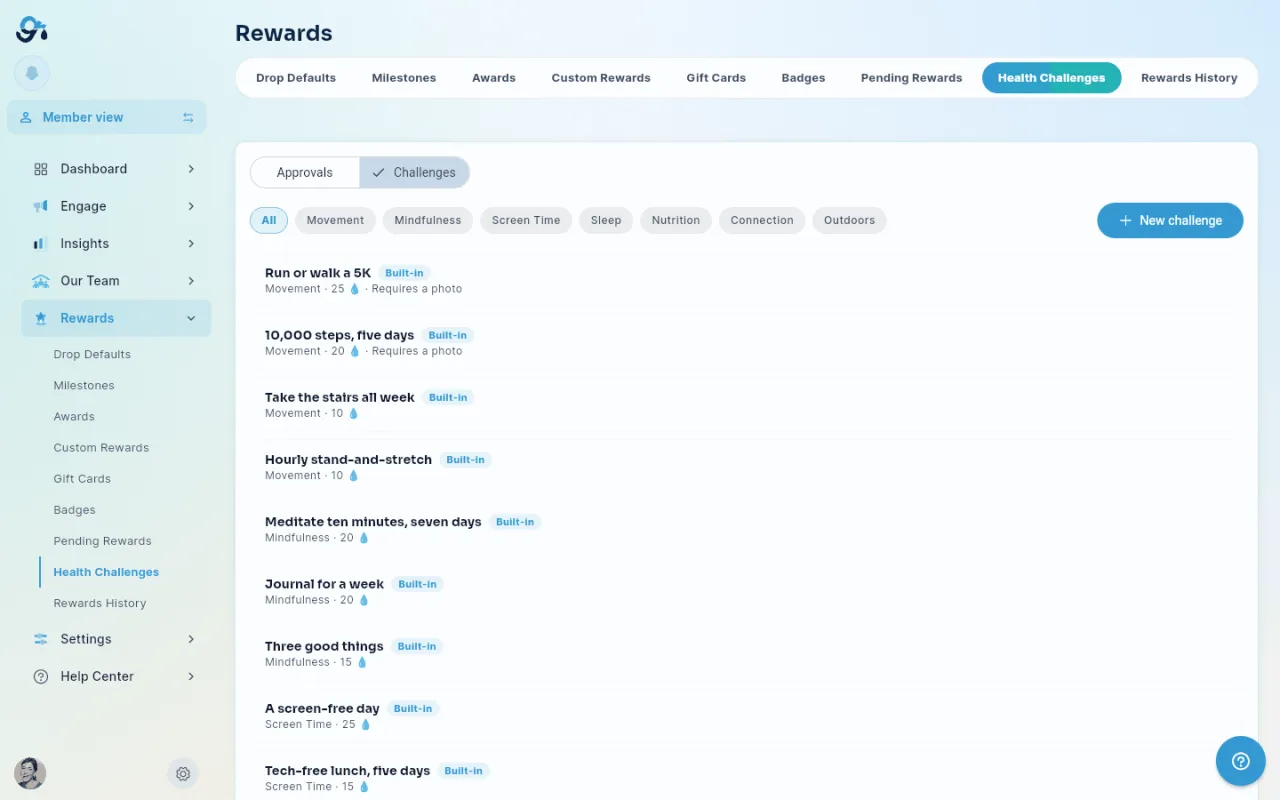
- Built-in challenges are Give River's starter set of about twenty, available to every team. They can't be edited — if you want a variant, create your own.
- New challenge — write your own: title, description, what members should submit as proof, category, drop value, and whether a photo is required.
- Enable / Disable — your own challenges can be switched off without deleting them; disabled challenges disappear from Wellspring but stay listed here so you can bring them back.
Where the drops come from
Approved claims credit earned drops — the same bucket as badges — so they don't touch anyone's shareable allowance or your River Bank.
Did this article help?
Related articles.
See the platform in action.
Free for up to 25 members, or try Core or Growth free for 30 days. A card is required; Free is never charged, and a trial bills when it ends unless you cancel.