Wellspring
Wellspring is where wellbeing lives in Give River. It gathers the calmer parts of the app in one place — a moment to breathe, a daily reflection, and wellness activities that earn you drops.
You'll find it in the main navigation, just below River Runs.
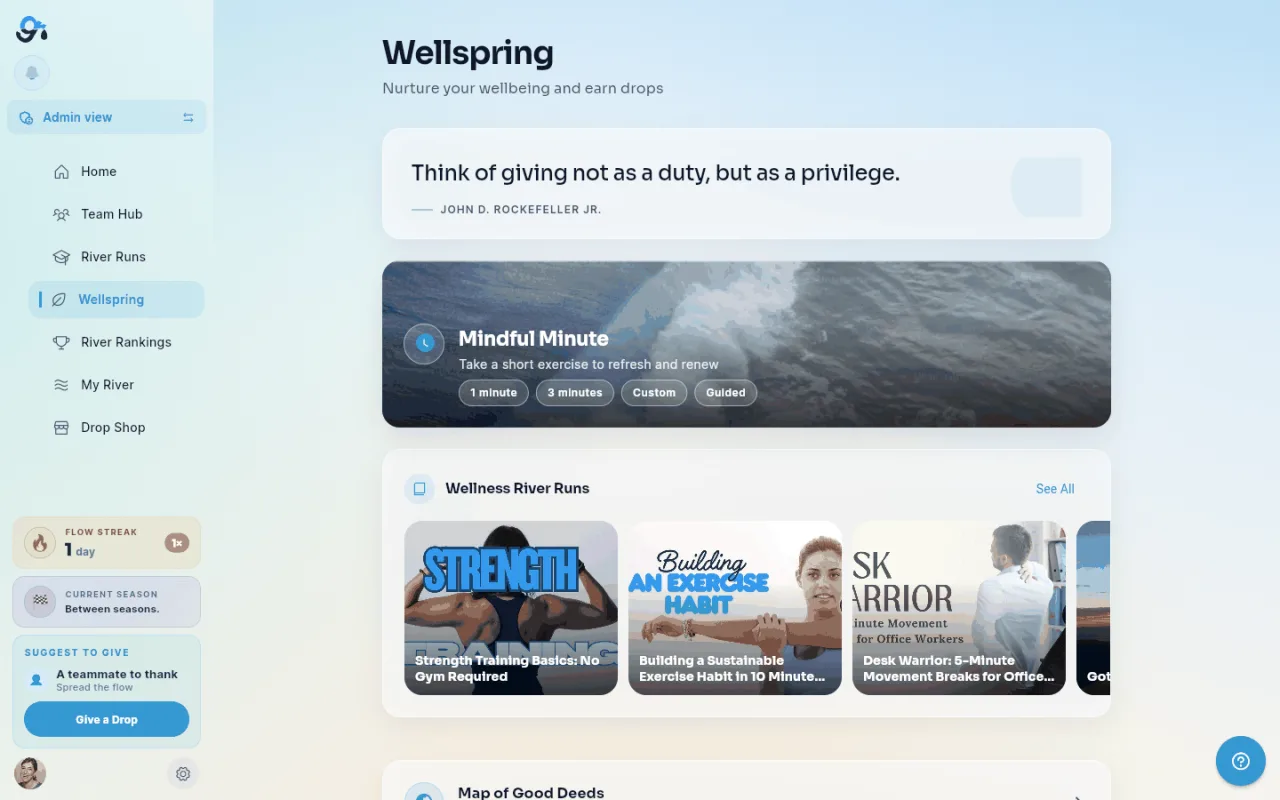
The top of the page carries a softly faded nature photo behind a calm blue wash, with a fresh scene each day.
What's on the page
Daily quote
A rotating quote at the top of the page. It changes once a day.
Mindful Minute
A short guided exercise to reset your focus. Tap the card to start; it takes about a minute.
Daily Reflections
A horizontally scrollable row of reflection cards. The Add Reflection card comes first, followed by reflections your teammates have shared.
Tap Add Reflection to respond to today's prompt. Your completed card joins the row. Tap the ⓘ beside the section title for a quick explanation of what Daily Reflections are.
Daily Reflections only appears when two things are true: your admin has enabled Daily Reflections for your team, and at least one Daily Drop prompt is active. See the Reflections article for the full flow.
Wellness River Runs
A row of courses from your team's wellbeing categories — meditation, movement, sleep and similar. Tap one to open it; a Joined badge marks courses you're already enrolled in. The row only appears if your team's learning library has wellness content.
Map of Good Deeds
Tap the Map of Good Deeds card to see kindness ripple across the map, with every good deed pinned where it happened. See Map of Good Deeds.
Health Challenges
Real-world wellbeing activities you complete on your own — run a 5K, take a screen-free day, journal for a week — and claim for drops.
- Tap a challenge card to see what it involves and what to submit as proof.
- Add a short note about how it went, and a photo where the challenge asks for one.
- Tap Submit for approval. The card shows Pending approval while an admin reviews it.
- When it's approved, the drops are added to your earned balance and the card shows Earned.
If a claim is rejected, the card offers Try again — fix what the admin flagged and resubmit. Each challenge can only be earned once.
Earning drops
Reflections earn drops when your admin has configured them to, and each health challenge shows its drop value on the card. Check the Reflections article, or ask your admin, for what a completed reflection is worth on your team.
Did this article help?
Related articles.
See the platform in action.
Free for up to 25 members, or try Core or Growth free for 30 days. A card is required; Free is never charged, and a trial bills when it ends unless you cancel.